A Deep Dive into AnalogX - The Future of Analog Emulation
An article designed to educate new Genesis users and those that want to geek out
AnalogX Neural Technology Explained: Genesis, WaveNet, GPU Processing, and the Future of Analog Sound
Written by Stuart Dawson 12.06.26
Analog sound has always been about more than frequency response.
The reason producers and mix engineers still love classic studio hardware is not simply because it boosts lows, softens highs, or adds harmonic colour. Real analog equipment reacts. A preamp thickens when it is driven. A tape machine gently compresses transients. A transformer adds weight. A compressor grabs, releases, breathes, and moves with the music.
That living, responsive behaviour is what makes analog sound feel musical.
It is also what makes it so difficult to recreate inside a DAW.
AnalogX was created to solve that problem. Our goal is to bring the tone, depth, warmth, saturation, movement, and non-linear behaviour of real studio hardware into a modern digital workflow. With Genesis, that sound becomes available inside your DAW as a flexible, expandable neural analog ecosystem.
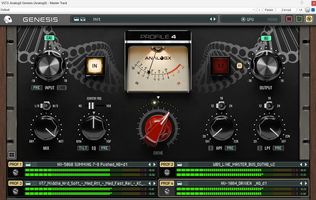
Genesis is the flagship plugin that powers AnalogX emulations, bringing the warmth and depth of real studio hardware into the box through High-Quality Neural Modelling. It is designed to capture the non-linear behaviour of vintage consoles, compressors, preamps, tape machines, and more, with every expansion pack becoming a new piece of hardware inside your DAW.
This article explains what Genesis is, what neural modelling means, why WaveNet-style deep learning is so important to our technology, and why GPU acceleration is the future of high-end analog emulation.
What Is Genesis?
Genesis is the heart of the AnalogX ecosystem.
It is the plugin platform that loads and powers AnalogX expansion packs, allowing producers and mix engineers to build analog-style signal chains directly inside the DAW. Instead of treating each emulation as a separate plugin, Genesis gives users one central environment where different models can be loaded, auditioned, gain-staged, blended, and chained together.
In practical terms, Genesis lets you place the sound of analog hardware across your session.
You can use it on vocals, drums, bass, synths, guitars, buses, mix buses, masters, and entire production chains. You can add the tone of preamps, the glue of compressors, the movement of tape machines, the density of saturation units, the depth of summing chains, and the colour of consoles.
AnalogX describes Genesis as the core of the AnalogX ecosystem, built to deliver warmth, depth, and non-linear behaviour from legendary studio hardware, including consoles, compressors, tape machines, and preamps.
For users, that means one important thing:
Genesis is not just another analog-style plugin. It is a growing analog mixing environment inside your DAW.
What Makes Analog Hardware So Difficult to Emulate?
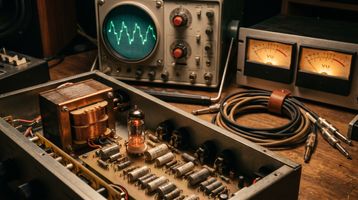
Analog hardware is difficult to emulate because it is not static.
A simple digital EQ curve can boost 100 Hz or cut 5 kHz. A simple saturation algorithm can add harmonics. But real analog hardware does far more than that.
Analog equipment changes depending on the signal.
It reacts differently to a vocal than it does to a drum bus. It behaves differently when driven quietly, moderately, or aggressively. It may respond differently to low-frequency energy, fast transients, stereo material, dense mixes, or short peaks. It may also have memory, meaning what happened a moment ago can affect what happens next.
That is why analog processing can feel three-dimensional. It has movement. It has weight. It has push and pull. It has a relationship with the music.
Traditional plugin emulations often capture part of that experience, but not always the whole behaviour. Some may model an EQ curve, a static distortion shape, or a simplified circuit response. Those approaches can be useful, but they can struggle to reproduce the complex, non-linear, time-dependent response that makes hardware feel alive.
This is where neural modelling becomes so powerful.
What Is Neural Technology?
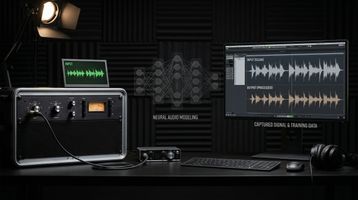
Neural technology uses machine learning to study the behaviour of real hardware.
Instead of only trying to rebuild a circuit from a schematic, a neural model learns from audio. It listens to examples of what goes into a hardware device and what comes out. Over time, it learns the relationship between the input and the output.
That relationship is the key.
A great analog emulation does not just need to know what the device sounds like at one setting or one level. It needs to understand how the device behaves across different material, different dynamics, different levels, and different musical contexts.
This is known as black-box modelling.
In black-box modelling, the system does not need to know every resistor, capacitor, transformer, valve, transistor, or op-amp inside the original hardware. Instead, it learns the behaviour of the device from measured input and output signals. Academic work on virtual analog modelling describes black-box modelling as measuring a circuit’s response to input signals and creating a model that replicates the observed input-output mapping.
For AnalogX, this approach allows us to focus on what producers and engineers actually care about:
How does the hardware sound, feel, move, saturate, compress, respond, and behave in a real mix?
That is the heart of Neural Technology.
WaveNet Deep Learning: Why AnalogX Chose The Neural Path
At the core of our latest AnalogX technology is a WaveNet-style deep learning approach.
WaveNet was originally introduced as a deep neural network for raw audio waveforms. Unlike older audio systems that rely only on simplified features or short audio fragments, WaveNet showed that a neural network could work directly with audio at the waveform level, modelling wideband audio signals at tens of thousands of samples per second.
For analog emulation, that idea is extremely powerful.
Real analog hardware works on the waveform. It reacts to level, frequency, transient shape, dynamic history, saturation, recovery, distortion, phase behaviour, and timing. If we want to reproduce that behaviour convincingly, we need technology that can understand audio at a deep level.
WaveNet-style modelling gives us a way to capture that behaviour as a complete input-and-output relationship. It can learn how a piece of hardware reacts when it is driven, how it recovers, how it saturates, how it shapes transients, and how its tone changes across different musical material.
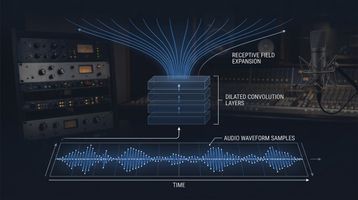
Research into real-time amplifier emulation has shown that WaveNet-style neural networks can be used for black-box modelling of highly nonlinear audio circuits, including guitar amplifiers and distortion pedals. These models use convolutional layers, dilated filters, and nonlinear activation stages to learn the behaviour of real audio devices.
That is why we believe WaveNet-style deep learning is the best route forward for serious analog emulation in 2026.
Not because it is easy.
Because it gives us the depth needed to capture the behaviour of analog hardware, not just the tone.
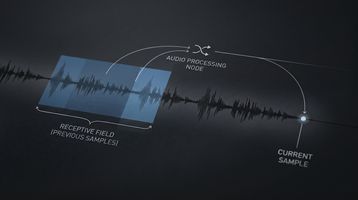
How WaveNet-Style Modelling Works
A WaveNet-style model studies audio over time.
Rather than only looking at one instant of sound in isolation, it can analyse a window of recent audio and use that context to predict how the hardware should respond. This matters because analog hardware often has memory.
A compressor does not only respond to the exact sample happening right now. It reacts based on attack, release, envelope, gain reduction, and the recent movement of the signal. Tape does not only add a fixed distortion shape. It can smear, round, compress, and saturate depending on level and signal history. Transformers, capacitors, valves, and other analog stages can also behave in ways that depend on what the signal has been doing over time.
This is where the idea of the receptive field becomes important.
The receptive field is how much recent audio history the model can “see” when deciding what the output should be. A small receptive field may capture simpler tone and distortion behaviour. A larger receptive field can capture more complex time-based behaviour, including dynamic movement, low-frequency response, compression recovery, transient shaping, and saturation memory.
In simple terms:
The larger and better-designed the receptive field, the more context the model has to understand the behaviour of the hardware.
That extra context can make a model feel more realistic, more responsive, and more analog.
But it also makes the work much harder.
Why WaveNet Is Powerful — and Why It Is Difficult
WaveNet-style black-box modelling is notoriously powerful, but it is also notoriously difficult to perfect.
With some forms of audio modelling, if you hear a problem, you can often adjust a specific setting. You might change an EQ curve, reduce a saturation amount, alter a transfer function, change an oversampling setting, or tweak a circuit parameter.
WaveNet does not work like that.
A WaveNet-style neural model is not a simple collection of exposed knobs. It is a learned structure. If an artifact appears during training, especially when working with larger receptive fields, there is rarely a single trainer setting that magically fixes it.
Solving those problems requires a deep understanding of the model architecture itself.
It may involve changes to the receptive field, dilation structure, model depth, training data, gain calibration, loss behaviour, activation design, data preparation, or the way the model handles extreme input conditions. Then the model has to be trained, tested, listened to, stressed, measured, and refined again.
This is where the real research and development happens.
A model may sound impressive on normal music but reveal issues under more demanding testing. Impulses, fast transients, silence, heavy low-frequency content, extreme gain staging, clipped signals, or unusual dynamic material can expose artifacts that are not obvious at first.
Those artifacts matter.
A producer might hear them as grain, fizz, transient smear, strange decay, unwanted high-frequency movement, unstable low end, or a behaviour that feels artificial rather than analog. A mix engineer might notice that a model sounds good on one source but becomes unpredictable across a full session.
At AnalogX, that was not good enough.
We did not want models that only sounded exciting for a quick demo. We wanted models that could be trusted in real production and mixing environments.
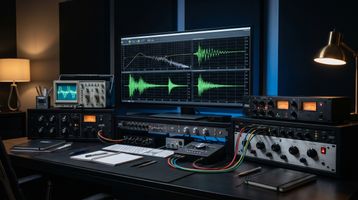
Two Years of R&D: Reaching Our Ultimate Model Tiers
After two years of constant research, testing, rebuilding, and refinement, AnalogX has reached what we consider our ultimate model tiers:
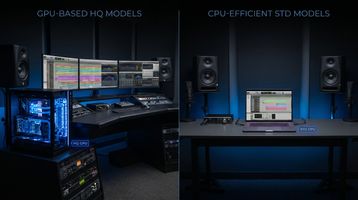
HQ v2.0 for GPU users
Our flagship model tier, designed for the highest level of realism, detail, depth, dynamic behaviour, and analog accuracy inside Genesis Pro.
STD v2.0 for CPU users
A more CPU-friendly model tier designed for users who want the AnalogX sound and workflow without needing GPU acceleration.
This is an important part of the Genesis ecosystem because not every producer or mix engineer works on the same system.
Some users want to run the most detailed HQ v2.0 models using GPU acceleration. Others want a lighter, faster workflow using STD v2.0 on CPU. Some may use STD models across a large session, then reach for HQ models on key vocals, drums, buses, or the mix bus. Others may use HQ models and simply bounce in place, freeze, or render tracks inside their DAW when they want the highest possible quality without running every instance live.
Genesis is built to give users those choices.
Genesis Core v2.0 is positioned as the entry point into the AnalogX ecosystem, compatible with expansion packs, while Genesis Pro adds GPU capability for running high-quality Genesis models directly on the GPU and freeing the CPU for instruments, reverbs, and production workflows.
With Version 2, our focus was not only realism, it was realism and reliability.
We wanted the models to compare more closely to the analog devices they were based on while also reducing the artifacts that can appear in deep learning models under traditional impulse testing, transient testing, and other stress-test methodologies.
That required persistence. It required architecture changes, repeated tests, listening sessions, technical analysis, failed attempts, new approaches, and more refinement.
We are proud to say that with HQ v2.0 and STD v2.0, we believe we have reached a new level of neural analog modelling.
The result is our most advanced technology to date:
Models that capture the sound, movement, harmonic structure, dynamic response, and non-linear behaviour of analog hardware, while staying cleaner, more controlled, and more reliable in real-world sessions.
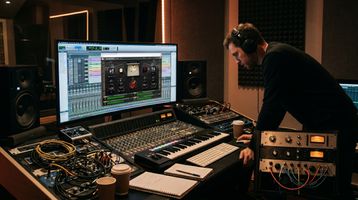
What Genesis Does in a Production Workflow
Genesis is designed to fit naturally into the way producers and mix engineers already work.
You do not need to change your entire workflow. You load Genesis, choose the model or expansion pack you want, gain-stage it correctly, and start shaping the sound.
On individual tracks, Genesis can add colour, weight, depth, saturation, punch, or smoothness. A vocal can be given preamp richness. A bass can be driven through saturation. Drums can be shaped with compression, console tone, transformer weight, or tape-style movement. Synths can be made warmer, wider, deeper, or more three-dimensional.
On groups and buses, Genesis can help create glue. This is where analog-style processing becomes especially powerful. When multiple sounds pass through the same style of console, tape, saturation, or summing chain, the mix can begin to feel more connected. Individual tracks stop sounding like isolated digital parts and start behaving more like a record.
On the mix bus or master, Genesis can be used subtly to add density, polish, harmonic richness, and final-stage analog movement.
The key is that Genesis is not just about making audio “warmer.”
It is about helping digital productions feel more finished, more alive, and more emotionally connected.
Benefits for Producers
For producers, Genesis is about speed, tone, and inspiration.
Modern production often happens entirely inside the box. That gives us huge creative freedom, but it can also lead to productions that feel too clean, too flat, or too disconnected. Genesis helps bring back the tone and movement associated with real studio hardware while keeping the speed and recall of software.
You can quickly audition different analog flavours, try different preamps or tape-style colours, add saturation without patching hardware, and create a more finished sound while you are still producing.
That matters because sound influences decisions.
A drum loop may inspire a better groove once it has console weight. A vocal may feel more expensive when it is monitored through a rich preamp-style chain. A synth may sit in the track faster once it has the harmonic depth of an analog path. A rough production can start feeling like a record earlier in the creative process.
Genesis gives producers a faster route to vibe.
It helps you make decisions based on feeling, not just technical correction.
Benefits for Mix Engineers
For mix engineers, Genesis is about control, consistency, recall, and scale.
Hardware sounds incredible, but it comes with real limitations. You may only have one unit. Recall can be slow. Maintenance can be expensive. Running every channel through analog hardware is not realistic for most studios, especially when modern sessions can contain dozens or hundreds of tracks.
Genesis gives engineers access to analog-style processing across an entire mix.
You can build console-style workflows, use tape or saturation across groups, place preamp colour on individual tracks, create parallel chains, shape buses, and add mix bus depth, all inside a recallable DAW session.
Version 2 also improves the practical workflow. AnalogX describes refinements including gain-staging meters, improved browsing, calibrated metering, plugin delay compensation, and phase-accurate wet/dry blending for HQ and STD models.
For engineers, that means less time fighting the session and more time making musical decisions.
Genesis helps bridge the gap between classic analog workflow and modern in-the-box mixing.
Why GPU Technology Changes Everything
Neural analog emulation is powerful, but it is also demanding.
The more detailed the model, the more processing power it requires. In a modern DAW session, the CPU is already doing a lot of work. It may be running virtual instruments, reverbs, delays, samplers, automation, oversampling, mastering processors, and dozens of other plugins at the same time.
If we want neural analog modelling to become a complete mixing environment, not just a single special effect, we need more processing headroom.
That is why GPU technology is so important.
A GPU is designed for large-scale parallel processing. While a CPU is excellent for general-purpose computing, a GPU is built to handle many operations at once. That makes it a natural fit for demanding neural processing, especially when the goal is to run many high-quality models across a large session.
Genesis Pro brings this idea into the AnalogX ecosystem.
AnalogX presents Genesis Pro as a GPU-based analog mixing ecosystem that moves analog modelling to the GPU, allowing large analog-style mixes with minimal CPU strain, CPU/GPU switching, low-latency tracking options, and GPU-powered neural processing.
This is not just about making one plugin run faster.
It changes what is possible inside the DAW.
Instead of saving neural analog emulation for a few special tracks, producers and engineers can start thinking in terms of full analog signal paths: preamps, consoles, tape machines, compressors, saturation stages, summing chains, and mix bus processing across the entire session.
That is the future Genesis Pro is built for.
HQ v2.0, STD v2.0, and Real-World Workflow Choices
The future of audio technology should not exclude users based on their system.
That is why AnalogX now has two clear model tiers.
HQ v2.0 is the flagship tier. It is designed for maximum realism and is ideal for GPU users who want the deepest and most detailed AnalogX experience inside Genesis Pro.
STD v2.0 is the CPU-friendly tier. It is designed for users who want the AnalogX sound in a more efficient format that works better for larger CPU-based sessions.
This gives users flexibility.
A producer working on a laptop may choose STD models during production to keep the session light. A mix engineer using Genesis Pro may choose HQ models across key channels and buses. A user without a compatible GPU can still use HQ models when needed and bounce in place, freeze, or render inside the DAW.
The point is not to force one workflow.
The point is to make neural analog technology usable in real music production.
Genesis gives users a scalable path: efficient CPU use when needed, flagship GPU power when available, and the freedom to choose the right model tier for the job.
Why WaveNet and GPU Together Are the Future
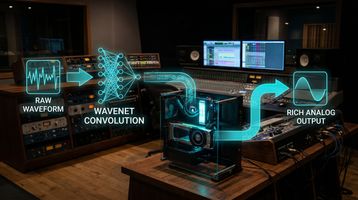
WaveNet-style deep learning and GPU acceleration solve two different parts of the same problem.
WaveNet-style modelling gives us depth. It allows us to capture complex non-linear behaviour, signal history, dynamic movement, saturation response, and the living character of analog hardware.
GPU acceleration gives us scale. It allows those more detailed models to be used more freely across real DAW sessions without forcing the CPU to carry everything.
Together, they represent the next step in analog emulation.
For years, plugin developers have tried to recreate analog sound in the box. Many tools have done parts of that well. But the future is not only about making one compressor or one preamp sound better. It is about recreating the feeling of an analog workflow across the whole production.
That means entire chains.
It means multiple pieces of gear interacting.
It means analog tone on tracks, buses, and the mix bus.
It means realistic non-linear response at scale.
That is what WaveNet-style modelling and GPU-powered processing make possible.
At AnalogX, we believe this is where analog emulation is heading in 2026 and beyond.
Not static snapshots.
Not simple saturation curves.
Not lightweight approximations as found in other "light" wavenet or LSTM approaches.
But deep, responsive, neural models that capture the behaviour of hardware and can be used across a full modern session.
The AnalogX Vision
Genesis exists because we believe producers and engineers should not have to choose between analog tone and digital workflow.
You should be able to work quickly, recall instantly, mix entirely inside your DAW, and still experience the weight, depth, saturation, punch, glue, and musicality that made classic studio hardware so important in the first place.
Neural Technology allows us to capture the behaviour of real analog equipment.
WaveNet-style deep learning gives us the depth to model that behaviour at the waveform level.
Version 2 represents two years of constant R&D, refinement, testing, and persistence.
HQ v2.0 gives GPU users our most detailed and realistic model tier.
STD v2.0 gives CPU users an efficient way to access the AnalogX sound.
Genesis brings it all together in one expandable plugin ecosystem.
And Genesis Pro takes the next step by using GPU technology to unlock larger, deeper, more ambitious neural analog workflows inside the DAW.
This is the future of analog sound:
not locked away in racks,
not limited by patchbays,
not restricted to a handful of hardware channels,
and not held back by the limits of traditional plugin processing.
With Genesis, analog becomes a living, expandable ecosystem inside your DAW.
With WaveNet-style Version 2 technology, it becomes more realistic, more responsive, and more refined.
And with GPU-powered Genesis Pro, that ecosystem is ready for the future of mixing.
Experience Genesis
Whether you are a producer looking for instant vibe, a mix engineer chasing depth and glue, or a technically curious user interested in the future of neural analog modelling, Genesis gives you a new way to work.
Load a model.
Dial in the level.
Build your chain.
Hear the movement, weight, saturation, and realism of AnalogX Neural Technology inside your DAW.
Genesis is not just analog emulation.
It is the next generation of analog sound in the box.